
Underground factory · Setup guide & checklist
Graveyard Keeper 2 factory layout: setup guide & checklist
Start with one short production line, not a whole factory. This Graveyard Keeper 2 factory setup guide helps you choose a goal, check inputs and workers, test collection, and save your building checklist. Players suggest a small chest–belt–station–belt–chest test line instead of connecting every store at once. Treat that as a starting idea to test in your game, not a tile-accurate blueprint or a full simulator.
Patch-sensitive — evidence reviewed 2026-10-15. The official Steam news lists Update 1.010 as the latest official update at review time. Community observations below span earlier builds and guides updated October 9; their dates do not prove a specific game version. Compare each connection and power change with your current game, especially after a patch.
The layout discussion and missing-tutorial thread describe this small-line approach. Their advice is useful for deciding what to test; it does not establish exact ports, spacing or conveyor rules for every machine.
Set up your first line step by step
- Choose the output first. Read the kit, repair or order requirement in your current save. Start with one unlocked recipe rather than designing for every possible product.
- Check prerequisites before placing anything. Confirm the conveyor and station technologies shown in your game, the required extension, a suitable station worker and the carousel’s current requirements. For a missing station, use the Assembly Bench checklist; for assignment problems, use the Zombie guide.
- Keep the test local. Pick a buildable area and inspect the machine’s own input and output indicators. Plan source storage and a destination for this one recipe. Community advice favors short connections and nearby storage; this page does not supply placement coordinates or guaranteed chest adjacency rules.
- Select the recipe and assign the worker. The tutorial-thread reply recommends choosing the recipe, putting a zombie on the bench, and loading its ingredients. Verify mastery and extension requirements before diagnosing an empty resource display as a broken belt.
- Feed a small batch and watch the input. Confirm that the displayed ingredients actually reach the selected recipe. Do not add more stations while this step is failing. The same player reply treats lumber as a special case connected from its factory stash: check the actual lumber source in game instead of assuming any chest can feed logs.
- Watch crafting and collection separately. Confirm that the station crafts, then that an ordinary finished kit reaches your intended destination. Players distinguish kits from liftable Supply crates; test the final object rather than assuming both use the same container.
- Read the gear HUD, then expand one segment. Note the current usage and available gears before and after the change. Keep the tested line as your baseline. Only add the next ingredient route or product after the first line completes its full input-to-collection cycle.
CONCEPT ONLY — NOT tile-accurate / NOT an in-game blueprint.
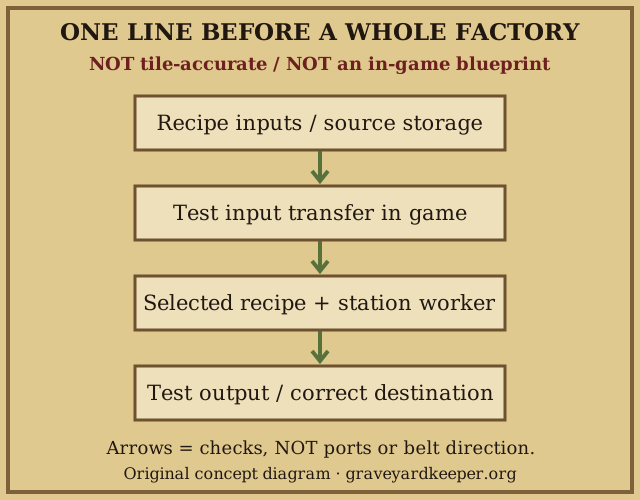
Factory layout building checklist
Choose what you are building for. Each goal has its own progress; checked boxes record your checks, not game-detected completion. Progress is stored only in this browser, separately from the recipe calculator. Nothing here calculates power, rates or optimal placement.
Enable JavaScript to select a goal, tick checks and save progress. All four goal plans are readable below without it.
Checklist not yet active. No game data is read.
First line
Start with one ordinary kit and manually supplied ingredients. Prove the input, crafting and collection steps before connecting distant resource stores.
Assembly Bench checklist · Worker assignment help
City rebuilding
Read the current repair requirement first. Start with the wood or stone kit actually needed, then add intermediate products one at a time; a full restoration factory is not required for the first test.
House repair / Green Scroll help · Calculate kit materials
Warehouse orders
An ordinary kit and a liftable Supply crate are different delivery targets in player reports. Plan around the current order and collection day, not an old screenshot’s weekly output claim.
Warehouse orders and Supply: Iron · Calculate order materials
Textiles
Third-party guides describe flax processing with an Assembly Bench and Spinning wheel extension. Confirm the recipe and worker requirements in your build; first test ordinary Fabric collection, separately from any Supply: Fabric crate, before automating garden delivery.
Flax and gardening blockers · Zombie worker troubleshooting · Find a supported fabric recipe
Community-documented connection & rotation rules
These are player observations, not an official placement specification or tests performed by this site. Individual rules may be single-source; the citations identify which author reports each behavior, not a blanket multi-source verification of every rule. The authors’ game builds are unknown; an October 9 guide update does not identify its tested build. Try one small batch first. Fortigan’s edits qualify the earlier rules, so keep the exceptions with the advice.
- Input contact: stations reportedly pull resources touching their input points regardless of conveyor direction, except resources on the input end of an underground conveyor. Fortigan — Key functionality mechanics and Final Edits, Edit 3.
- Direct chest connections: stations reportedly cannot take input directly from a chest. A station not rotated sideways reportedly has a built-in output conveyor and can output directly into a chest; a station rotated sideways cannot output directly to a chest. The built-in output can also steal items from a neighboring chest. Fortigan — mechanics and Final Edits, Edit 2.
- Passing a chest: conveyors reportedly pull from chests they pass beside, without needing to point away from the chest. Isolate unwanted neighboring transfers when testing. Fortigan — chest extraction rule; chest-side transfer complaint.
- Underground extraction: the entry end of an underground conveyor reportedly pulls from a chest from any side, like a regular conveyor. Do not confuse this chest-extraction rule with the station-input exception above. Fortigan — underground entry rule and Edit 3.
- Logs: logs cannot go in chests according to the guide; they need a conveyor route all the way to the station that needs them. Fortigan — log routing rule.
- Chest filters: Fortigan describes filters for each output direction and says a chest can replace a splitter in almost every situation to save power. This is not a guarantee for every junction; test the chosen filters and destinations. Fortigan — chest filters and splitter alternative; Russian factory guide — directional chest outputs.
- Rotation topology: JimSSng reports two inputs remaining on the same side and the output on the opposite side, so rotating does not fundamentally change the routing topology. Reflections on Factory Design — October 5.
- Restricted directions: players report not all four directions are available; TheCollector specifically reports being unable to face both Assembly Machine inputs north. This Assembly Machine report is not a port specification for every station. Do not plan arbitrary four-way ports from a screenshot. Horse Hotdog — September 28; Rotate Assembly machine for northern Input — October 2.
Power and storage: what to check, not what to assume
Observe the gear HUD and whether the line actually runs. The HUD may be affected by a display bug; a reading alone does not resolve workstation power. These component values agree across the linked community sources where noted. They are dated reports, not a calculator for your complete layout.
| Component | Reported value | Evidence and limits |
|---|---|---|
| Conveyor belt | 1 per segment | Fortigan and kosiauke, October 4 agree. |
| Underground conveyor | 2 per five-tile span | Fortigan, kosiauke and the Russian guide agree on 2; both guides describe five spaces. |
| Conveyor chest | 0 | Fortigan and kosiauke report no chest power cost. Filters still need testing. |
| Zombie carousel | Up to 4 zombies; 7 each, or 10 each with the perk | The Russian guide reports capacity and both values; procnessil also reports capacity 4, and di eshor ribly, October 8 reports 10 with the smithing inspiration. |
Station power remains disputed. Fortigan budgets stations at 1 power in the guide’s mechanics list. In contrast, procnessil’s September 26 reply describes power as specifically for belts and production stations as powered by their assigned zombies. Fortigan’s Final Edits, Edit 1 calls sideways stations a power bug: those stations reportedly do not consume power, so the example displays 77 instead of the author’s planned 80. This is community attribution, not an official resolution or a confirmed fix. We therefore publish no single station value and no site-calculated factory total.
The sideways report does not establish that procnessil used sideways stations, and the date difference does not prove a version change. To investigate, keep the same build, save, tools, perks and supply/logistics configuration; add, remove or rotate one station without changing belts or chests. Record the machine and orientation, total power reading and whether the line can run. This comparison has not been performed by this site, and HUD totals alone may still reflect a display problem.
Players recommend nearby chests and shorter conveyor runs before a line works. Fortigan’s chest and splitter suggestions above help identify experiments, not an efficiency-optimal arrangement.
The developers’ future plans announce an increase in gears provided by zombies for conveyors. Steam Update 1.010 now confirms more gears with the Belt Master perk, without publishing an exact quantity. Update 1.008 addressed a conveyor-related save-loading issue, and Update 1.009 addressed conveyor-storage collisions and worker assignment issues; neither is a complete placement specification.
The October 2 developer announcement also planned the ability to move already constructed workstations. That does not confirm a released movement feature or a rotation fix. The 1.010 changelog does not explicitly resolve station power or sideways behavior; its silence does not rule out unannounced changes.
Do not confuse the Bioreactor’s Zombie Power item with a verified source of factory gears. For an iron or steel route, check Steel and the Royal Foundry separately from this setup checklist.
Supply delivery is not ordinary kit storage
The Russian zombie, factory and orders guide, updated October 9 describes a Supply Station as the pickup point for a zombie porter and describes Supply crates as liftable objects, carried by hand rather than stored in inventory. It directs deliveries to the town warehouse basement. This route description comes from a single community guide, not a delivery test by this site. Do not equate a conveyor chest holding ordinary kits with a Supply Station or completed warehouse delivery; inspect the product and current order before building that route. For order requirements, use the orders and Supply: Iron guide.
Order capacity and quantities: the Russian guide and a recent delivery discussion report only two simultaneous orders. bolemeus’s October 2 post reports 10 items per week for tier II and III orders, while the Russian guide’s October 9 revision says a patch reduced required goods and increased Gratitude. Do not combine those reports into a fixed quantity or reward: compare the current order UI, tier and deadline.
If the test line fails
R-key rotation trouble: Lee reports temporarily restoring default keybindings after binding work to R, then rotating and placing before restoring preferred bindings. Erebos reports that moving a binding back from R to W did not solve rotation. Save your bindings before trying a reset; this is not a promised repair or proof that a machine can face every direction.
- No input: compare recipe names, source items, extension and worker requirements; observe one input connection before rebuilding a whole line.
- Crafts but does not collect: identify whether the output is an ordinary item or liftable Supply crate; inspect the destination and unintended neighboring connections.
- Stops after an expansion: compare the current gear HUD and worker assignments with the last working state. Remove assumptions about old screenshots’ power totals.
- Cannot build in an area: players in the layout-sharing thread describe repairing broken gear systems beneath holes in the floor. Inspect the repair prompt in your save; do not assume every visible floor is buildable.
Real player layouts: external references
These are hosted on Steam by their authors — we link, we do not copy. Screenshots can inspire a compact factory, but a still image does not reveal every hidden connection, recipe or machine port. Their upload dates are not proof of the game version. Do not treat them as a guaranteed layout to reproduce.
- “Factorio Keeper!” — SJkr8, September 26, 2026. A player’s factory example; use the accompanying storage discussion for context, not to infer component-by-component power.
- “Minimal layout capable of 150 gratitude” — PsychoTheWeasel, October 2, 2026. The title is the author’s output claim, not our production guarantee.
- Factory Layout for Repairing the City — CJS_Altair. Community screenshot reference, not a placement plan validated by this site.
Staged kit factory: Fortigan’s guide, updated October 9 gives three stages: normal houses, large houses, then blocks, adding to the existing factory instead of rebuilding it each time. The author self-reports 80 power and 26 zombies (8 for power and 18 for stations) for the full T1/T2 kit example and includes a “Proof It Functions” section. These are external case-study claims, not tested by this site, and the guide’s sideways-station display bug caveat applies. Follow the author’s guide for the actual images and staged layout; this page does not reproduce a tile plan or promise that total in your build.
Community planning tools
- Community Factory Spreadsheet — linked by Fortigan. The cached guide links this document for kit/supply factories, formulas and builder templates. It is an external community resource, not this site’s calculator; we verified the link in the source, not the spreadsheet’s formulas or results.
- Lohres’s external factory planning editor, introduced in the author’s Steam guide. The cached interface offers rotation, belt-direction arrows, plan-code export/import and PNG export. Its machine footprints are not verified against the game by this site; use it to sketch ideas, then inspect actual ports, storage and obstacles in your save. It is not our sandbox or a throughput validator.
Scope: a setup guide, not a simulator
This is the underground factory guide, not a graveyard decoration layout.
This page includes community-documented connection and rotation observations, with their exceptions and source limits. We still have no verified per-machine footprints or port-coordinate table, same-build rotation tests or measured crafting rates. Consequently this page cannot give exact wiring, machine ratios, throughput, power totals or an efficiency-optimal layout. The useful first step is to validate one short line in your current build and expand from observed behavior.
Factory setup FAQ
Is this a copyable factory blueprint or simulator?
No. This is a setup guide and saved checklist. The original diagram shows relationships to test, not machine tiles, ports, rotations, belt routing or production speed.
Why does a connected machine show no resources?
Players suggest selecting a recipe and assigning a suitable worker before testing ingredient intake. Compare the displayed recipe with the source items, then inspect one connection at a time; this is a diagnostic suggestion, not a guaranteed bug fix.
How much power does my layout need?
Fortigan uses 1 power per station as a planning budget, while procnessil describes power as for belts and stations as zombie-driven. Fortigan also reports sideways stations showing 77 instead of the example’s planned 80. These are community reports, not an official resolution; the HUD may have a display bug, so observe both its reading and whether the line runs as you change one component. The developers’ gear increase is a plan, not a confirmed released value. This guide does not calculate a power total.
Can I use the same chest for kits and Supply crates?
Do not assume so. Players distinguish ordinary finished kits from liftable Supply crates. Test the final product and follow the warehouse delivery instructions for the current order.
Why do items leave the wrong side of a chest?
A player reports unwanted transfers when another belt runs beside a conveyor chest. Isolate that chest and test each neighboring connection before reconnecting the rest of the factory.
Can I move a station after building it?
Players report having to dismantle and rebuild stations rather than freely move them. Moving already constructed workstations was planned in the October 2 developer announcement, not confirmed here as a released feature or a rotation fix. Check your current build’s controls and refund preview before removing anything; this page does not guarantee a refund.
Why does an old layout no longer match my orders?
Community sources report two orders at a time, not unlimited simultaneous orders. On October 2, bolemeus reported tier II and III orders requiring 10 items per week; the Russian guide updated October 9 says a patch required fewer goods and increased Gratitude. These are dated reports, not one universal quantity. Compare the current in-game order, tier, quantity and deadline before copying an old weekly output claim.
Why does the R key not rotate a structure?
A player who rebound work to R suggests temporarily restoring default keybindings before rotating and placing a structure. Another report says changing movement from R back to W did not solve it. A reset is a diagnostic suggestion, not a guaranteed fix; save your bindings first and check whether that structure supports the requested direction.
Setup sources: community advice and official patch context
- Factory layouts for the lazy keeper? · Steam Community · small-line suggestions
- Factory tutorial missing · Steam Community · recipe, worker and test-line sequence
- Need Help with Factory Storage and Power Management · Steam Community · storage and carousel reports
- Assembly Line / bench question · Steam Community · kits versus Supply crates
- Share Your Factory Layouts · Steam Community · build-area repairs and changing orders
- Factory Basics, Efficient Designs, and Builder Template — Fortigan · Community guide · workstation power conflicts with other reports
- Factory Automation & Layouts — textile route · Third-party guide · flax processing and Spinning wheel; confirm in your build
- Close Sides of Conveyor Chest · Steam Community · unwanted neighboring transfers